
Security Manager
Access to IPFusion Runtime can be restricted for users and groups. IPFusion can either use Default or use existing groups from Active Directory. Default - Runtime access is granted by users and groups defined in AIM Active Directory - Runtime access is granted by users and groups defined in Active Directory
To enable Security, go to . When prompted to confirm if you would like to enable security, click Confirm. The project will reload. This can take some time for larger projects. The Security Manager will pop up.
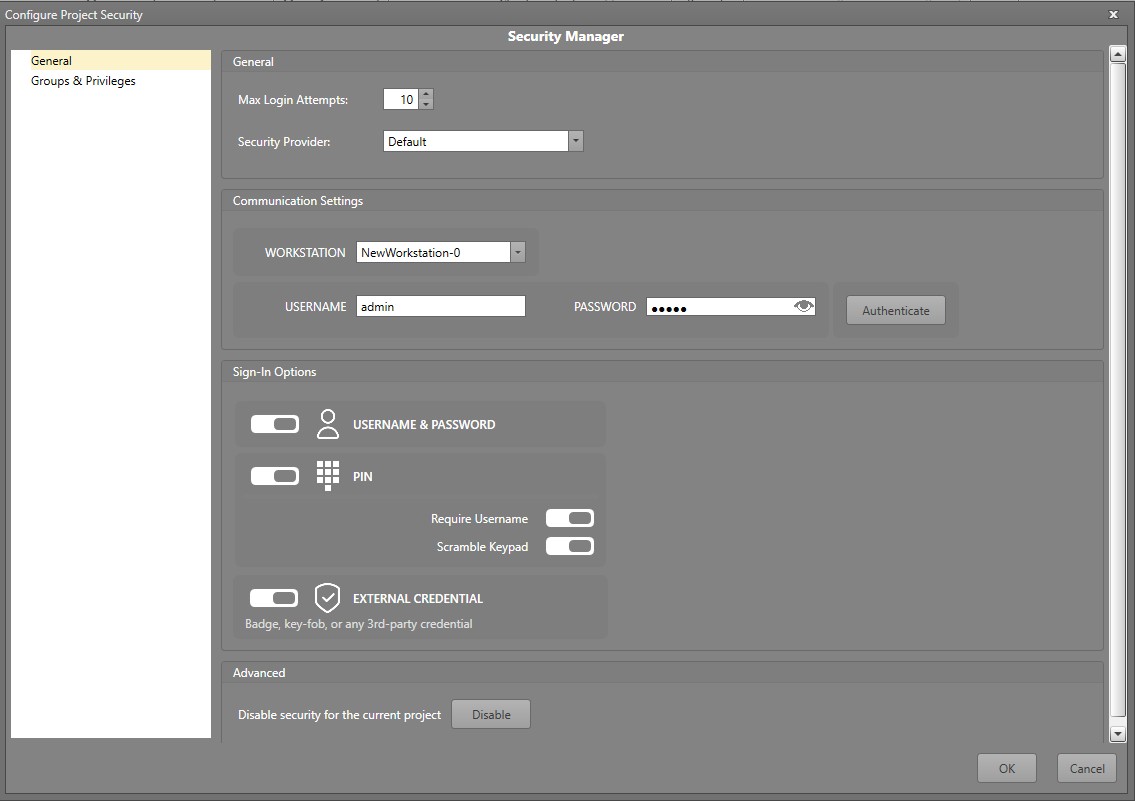
| Setting | Description |
|---|---|
| Max Login Attempts | The maximum number of failed login attempts that can be made before a user is blocked. To reset the attempts, IPFusion Runtime must be restarted. |
| Security Provider | The provider for the users and groups. This can be either Default
or Active Directory.
|
| Communication Settings | The location and credentials Designer will use to pull
configuration from the Access and Identity
Management Service.
|
| Sign-In Options | There are three types of sign-in methods. Toggling on one or more
allows users in Runtime to choose the method to use to sign-in. The
types of available sign-in methods are:
|
| Disable Security for the current project | This will turn off the security for IPFusion, disabling the permissions that were set up. |
Note: Sign-In Options and Communication
Settings are not applicable for projects using Active
Directory.