
Acre DNA Fusion Setup
To use Acre DNA Fusion, specific permissions must be configured and granted to enable proper access to the system. This includes setting up the Operator and the Client ID profile.
Operator Profile
Operators are assigned permissions through Profiles, which are essential for ensuring that users have either full or restricted access to software functionality during Runtime.
To assign a Profile:
- Open the dnaFusion application.
- Navigate to
- The Profiles are added, updated, and deleted in Operator Profiles.
- The Profiles are assigned in .
The Profile is required to have permissions to:
- Hardware
- Door
- Normal
- Door: Forced Arm
- Door: Held Arm
- Door: Set Door Mode
- Door: Temporary Unlock
- Normal
- Door
- Views
- Cardholder
- Hardware Manager
Client ID and Client Secret
A client is required for the driver to communicate with DNA Fusion via the Flex services. To configure a client, you must visit the clients page to perform this work.
Find the Client ID
On the front page, the Client ID is required. This can also be changed on a per-client basis:
- Navigate to the client web page.
- Select Edit on the desired client.
- Navigate to Name.
- Modify ClientId to desired identifier.
- Select Save Client.
Permissions Required
The client must have the appropriate access in order to:
- Access to the Flex API resources
- Create an access token using Resource Owner Password Credentials
To enable this access:
- Navigate to the client web page.
- Select Edit on the desired client.
- Navigate to Basics.
- Under Allowed Scopes add flex_api.
- Under Allowed Grant Types add password.
- Select Save Client.
Client Secret
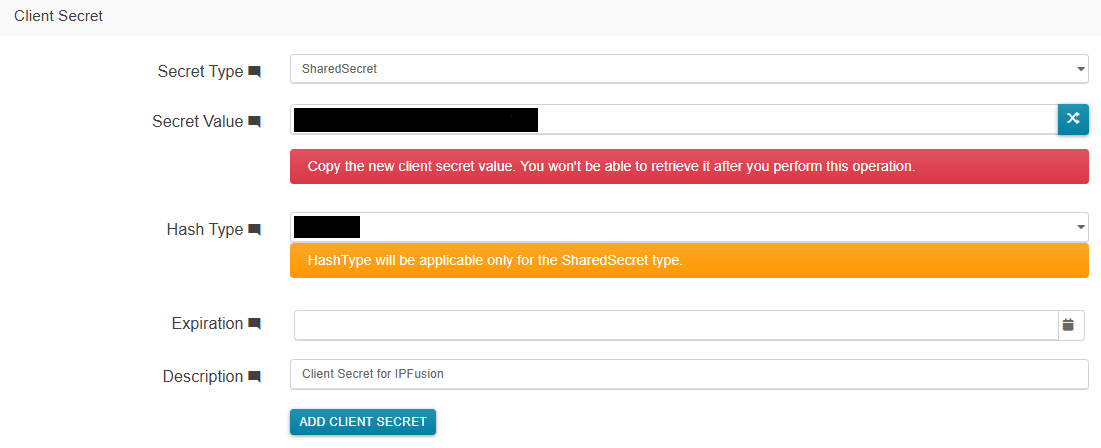
A client secret allows for an access token to be created for a given client. To create one:
- Navigate to the client web page.
- Select Edit on the desired client.
- Navigate to .
- Retrieve and save the Secret Value, as it will become inaccessible once Add Client Secret is clicked.
- Fill in the values as required.
- Select Add Client Secret.
Unique Keys
Unique Keys are hidden in the DNA Fusion software. These can be accessed via the Flex API, however a more efficient way to query this is through the database:
- Open SQL Server Management Studio 20
- Enter credentials and Connect
- Navigate to
To get unique keys for Doors go to dbo.Doors.
To get unique keys for Inputs go to dbo.InputPoints.