Create a Custom Asset Type in Advanced Mode

Custom asset types can be created for integrated systems in Advanced Mode. This guide walks through how to create one of these custom assets.

Each asset type will be used to represent a different set of states within the system. Using these, we can build composite assets which show various pieces of information about the asset. Each custom asset type created in Advanced Mode is derived from one of the asset types defined in Default Mode and extends its behavior and states. For example, a PTZ Camera or Fixed Camera in Advanced Mode is derived from the Camera asset type in Default Mode.

Note: The icon preview is presented larger for easier viewing and manipulation of elements. When dragged onto a Map, the size of the asset icon will match the configured values.

Add a New Asset Type

Start by creating the new asset type in the integrated system configuration page.

  1. In the Advanced Mode integrated system settings, navigate to Asset Types.
  2. In the navigation pane, expand Asset Types and select the asset type to create.
  3. Click Add.
  4. In the Asset Type Settings, set the Asset Type Name to a descriptive name for the asset type.
  5. Set the Background Color you wish to use for the asset.
  6. Name and customize the asset's caption appearance. Choose a Caption Color for standard display and a Selected Caption Color for when the asset is selected.
    Note: The asset's Caption, Caption Color, and Selected Caption Color will apply to all assets of that type.
  7. Configure the desired Icon Height and Width.

Add Elements to Display States

By default, there are four elements which are automatically created for a custom asset: Selected, No Communication, Masked. If more states are needed, add a new element.

  1. Select the type of element from the Elements drop-down and click Add. Choose between:
    • Image
    • Text
    • SVG
    • Symbol
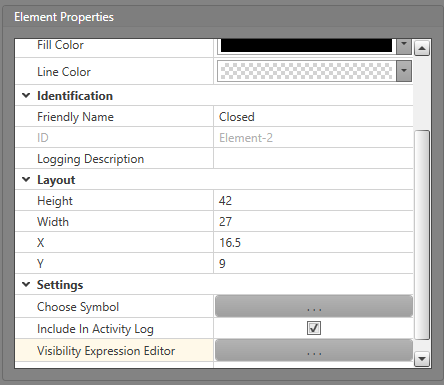
  2. In the Selected Element Properties list, configure the icon to represent how you want the state to appear.
  3. Click on the Visibility Expression Editor, to configure the visibility of each of the states.